
< Read user’s YouTube channel information Fetch uploaded videos (playlist items) Pagination support (next/prev page tokens) OAuth 2.0 authentication via Google Sign-In Combine-based reactive API
Architecture Diagram
Here is a diagram illustrating the flow of how YoutubeAPIService works with MyStoryListViewModel:
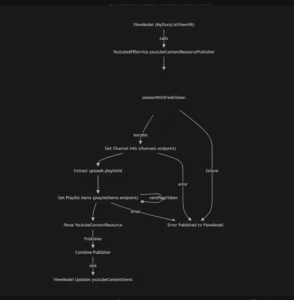
Note: Please manually add the diagram image from the linked page above by clicking “Add an image” below, or view it in the referenced page.
Flow Summary:
- MyStoryListViewModel calls the service to fetch YouTube data
- Service authenticates, fetches channel info, extracts playlist ID, and fetches playlist items
- Results are published via Combine, and ViewModel updates its data
- Errors at any stage are published back to the ViewModel
- Pagination is handled by looping with nextPageToken
Authentication
Required Scope
static let youtubeContentReadScope = kGTLRAuthScopeYouTubeReadonlyScope: https://www.googleapis.com/auth/youtube.readonly
Permissions: View YouTube account, channel info, uploaded videos (read-only)
API Endpoints
1. Get Channel Information
Endpoint: GET https://youtube.googleapis.com/youtube/v3/channels
Parameters:
part=snippet,statistics,contentDetailsmine=true
Purpose: Fetch authenticated user’s YouTube channel data
2. Get Playlist Items (Videos)
Endpoint: GET https://youtube.googleapis.com/youtube/v3/playlistItems
Parameters:
part=snippet,contentDetails,idmaxResults=5(can be increased to 50 max)playlistId={uploadsPlaylistId}pageToken={optional}
Purpose: Fetch user’s uploaded videos
Data Models
YoutubeContentResource
struct YoutubeContentResource: Codable {
    let kind: String
    let etag: String
    let nextPageToken: String?
    let prevPageToken: String?
    let pageInfo: PageInfo
    let items: [YoutubeItem]
}

struct YoutubeItem: Codable {
    let id: String
    let snippet: Snippet
}

struct Snippet: Codable {
    let publishedAt: String
    let title: String
    let description: String
    let thumbnails: Thumbnails
    let resourceId: ResourceId
}
Pagination
YouTube API uses token-based pagination:
nextPageToken– For fetching next pageprevPageToken– For fetching previous pagepageInfo.totalResults– Total available resultspageInfo.resultsPerPage– Results in current page
func loadMoreContent() {
    guard let nextToken = youtubeAPIService.nextPageToken else { return }

    youtubeAPIService.youtubeContentResourcePublisher(pageToken: nextToken) { publisher in
        // Handle next page...
    }
}
API Quotas & Limits
Daily Quota
- Default: 10,000 units/day
- Channels.list: 1 unit
- PlaylistItems.list: 1 unit
Best Practices for Quotas
Cache responses when possible Use maxResults wisely (5-50 range) Implement exponential backoff for retries Monitor quota usage in Google Cloud Console
Best Practices
Do
- Check for valid authentication before API calls
- Handle pagination limits (e.g., max 100 items)
- Use weak self in closures
- Store cancellables
- Handle errors gracefully
 Don’t
Don’t
- Don’t hardcode video IDs
- Don’t exceed rate limits
- Don’t ignore quota limits
- Don’t fetch all videos at once
- Don’t store access tokens directly
]]>